


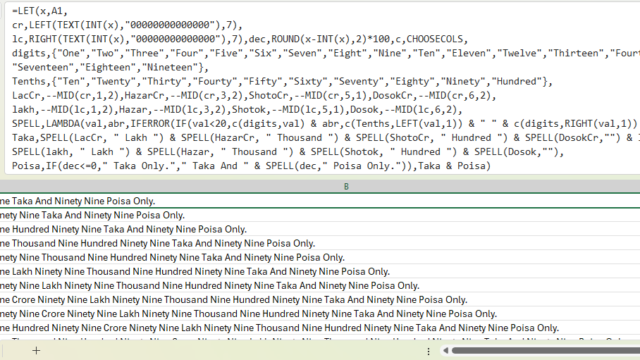
আসসালামু আলাইকুম ওয়া রাহমাতুল্লাহ। আমি আজকে দেখাবো কিভাবে শুধুমাত্র এক্সেল ফাংশন ব্যবহার করে বাংলাদেশি স্টাইলে নাম্বার থেকে কথায় প্রকাশ করা যায়। এখানে বাংলাদেশি স্টাইল বলতে বুঝিয়েছি লাখ, কোটি, হাজার। সাধারনত ইন্টারন্যাশনাল ভাবে মিলিয়ন, বিলিয়নে প্রকাশ করা হয়। যেমন, বাংলাদেশের ১০ লক্ষকে আন্তর্জাতিকভাবে ১ মিলিয়ন বলা হয়। ফর্মুলাটি সম্পূর্নভাবে আমার নিজের করা, ইন্টারনেট বা অন্য কোথাও থেকে কপি পেস্ট করা না।
Important Note: এই ফর্মুলাটি LAMBDA() function ব্যবহার করে করা। তাই এক্সেলের পুরনো ভার্শনগুলোতে এই ফর্মুলা কাজ করবে না। যে ভার্শনগুলোতে LAMBDA() function আছে, শুধুমাত্র সেই ভার্সনেই এটি কাজ করবে।
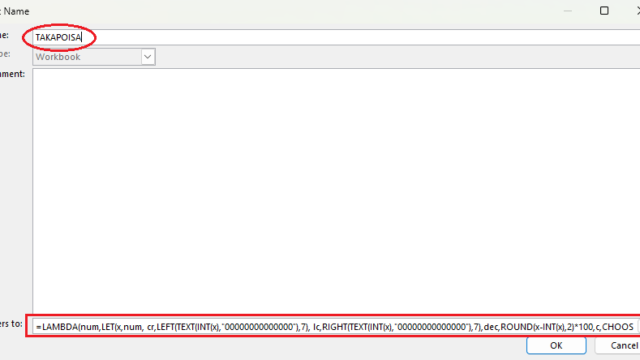
যেহেতু ফর্মুলাটি LAMBDA() function ব্যবহার করে করা, তাই নেম ম্যানেজার ব্যবহার করে আপনার নিজের মত করে ফাংশনের নাম দিতে পারবেন এবং সেই নামের ফাংশন কল করে নাম্বার থেকে টাকায় প্রকাশ করতে পারবেন। যেমন স্যাম্পল ফাইলে আমি ফাংশনের নাম দিয়েছি TAKAPOISA(). অর্থাৎ, A1 cell এ যদি নাম্বার থাকে তাহলে =TAKAPOISA(A1) লিখলেই ফাংশনটি কাজ করবে। নিচে ফুল ফাংশন দেওয়া হলো।
=LET(x, A1,
cr, LEFT(TEXT(INT(x), "00000000000000"), 7),
lc, RIGHT(TEXT(INT(x), "00000000000000"), 7), dec, ROUND(x-INT(x), 2)*100, c, CHOOSECOLS,
digits, {"One", "Two", "Three", "Four", "Five", "Six", "Seven", "Eight", "Nine", "Ten", "Eleven", "Twelve", "Thirteen", "Fourteen", "Fifteen", "Sixteen", "Seventeen", "Eighteen", "Nineteen"},
Tenths, {"Ten", "Twenty", "Thirty", "Fourty", "Fifty", "Sixty", "Seventy", "Eighty", "Ninety", "Hundred"},
LacCr, VALUE(MID(cr, 1, 2)), HazarCr, VALUE(MID(cr, 3, 2)), ShotoCr, VALUE(MID(cr, 5, 1)), DosokCr, VALUE(MID(cr, 6, 2)),
lakh, VALUE(MID(lc, 1, 2)), Hazar, VALUE(MID(lc, 3, 2)), Shotok, VALUE(MID(lc, 5, 1)), Dosok, VALUE(MID(lc, 6, 2)),
SPELL, LAMBDA(val, abr, IFERROR(IF(val<20, c(digits, val) & abr, c(Tenths, LEFT(val, 1))& IFERROR(" " & c(digits, RIGHT(val, 1)), "") & abr), "")),
Taka, SPELL(LacCr, " Lakh ") & SPELL(HazarCr, " Thousand ") & SPELL(ShotoCr, " Hundred ") & SPELL(DosokCr, "") & IF(-cr>0, " Crore ", "") & SPELL(lakh, " Lakh ") & SPELL(Hazar, " Thousand ") & SPELL(Shotok, " Hundred ") & SPELL(Dosok, ""),
Poisa, IF(dec<=0, " Taka Only.", " Taka And " & SPELL(dec, " Poisa Only.")), Taka & Poisa)
Name manager option screenshot:

আমি মোঃ হারুন অর রশিদ। IT Manager, Dhaka। বিশ্বের সর্ববৃহৎ বিজ্ঞান ও প্রযুক্তির সৌশল নেটওয়ার্ক - টেকটিউনস এ আমি 15 বছর 6 মাস যাবৎ যুক্ত আছি। টেকটিউনস আমি এ পর্যন্ত 34 টি টিউন ও 205 টি টিউমেন্ট করেছি। টেকটিউনসে আমার 6 ফলোয়ার আছে এবং আমি টেকটিউনসে 0 টিউনারকে ফলো করি।
B. Sc. in Computer Science & Engineering














I recently came across Prohoster.info while searching for reliable hosting and server solutions, and I must say I’m quite impressed. The site offers a variety of hosting plans including VPS, VDS, and dedicated servers, with flexible configurations to meet different needs. What really stood out to me is the user-friendly interface and the transparency in pricing. Everything is clearly listed, and there are no hidden fees. Their support team also seems responsive and knowledgeable, which is a big plus in this industry. Whether you’re launching a small website or managing a large-scale online project, Prohoster.info provides scalable options with solid uptime performance. I’ve also noticed they accept multiple payment methods, which adds to the convenience. Overall, if you’re looking for a dependable hosting service with good technical support, Prohoster.info is definitely worth checking out. I’ll be trying out one of their VPS packages soon and will share my full experience afterward. Would love to hear if anyone else here has used their services.